Today, I am here at the Xamarin Evolve worldwide developer conference. Xamarin has employees in many countries, and as far as I can tell, the company has flown most of its research & development department in to Austin to serve as speakers and staffers for the conference.
The conference has two parts, training, and lectures. The first two days are hands-on training sessions with two tracks: fundamentals, and advanced. Essentially, the fundamentals track appears to be full of long-time C# programmers who are new to the Xamarin tool and developing for iOS, Android, and Mac. The advanced track are targeted topics for folks already intimately familiar with the popular mobile operating systems.
For readers not familiar with Xamarin, this company, run by Miguel de Icaza and Nat Friedman of Mono fame, produces a stand-alone IDE for development of cross-platform native mobile apps on the Mac, and a Visual Studio extension for developing these within the Visual Studio project system.
For many years, the consumer markets have driven the mobile development technologies. The market demanded mobile applications, and the industry used the tools available to serve those customers. The cost of developing multiple code bases for the different platforms almost forced some enterprises to give HTML5 a look for cross-platform apps. There are some interesting HTML5 approaches to this, but Xamarin brings the promise of native applications to the C# developer using Visual Studio. Moreover, after researching and playing around with the product, it now appears feasible for enterprise developers to take native mobile applications in-house. The ability to use C# and Visual Studio to target iOS, and Android as well as WP8 is a game changer.
I will continue to watch this technology closely, but this is a transformative moment.
Over the weekend, I upgraded my Lenovo Yoga ultrabook/tablet to 8GB RAM and added a second SSD hard drive. First, I must give credit where credit is due. I watched this great video on YouTube that demonstrated how to do it all.
Video demonstration of second SSD install
The following was my experience, and I had a bit of difficulty in a few areas. First, in December, I purchased a Lenovo Yoga 13 from Best Buy for $999 + tax. I looked at Amazon, and Lenovo.com, but Best Buy had them for the same price and ready to go. The i7 machines were on back-order, so I took a chance on the Core i5. I have not been disappointed, actually (and I run LOTS of stuff). The base model had 4GB RAM and 128GB SSD. This laptop is super-thin, and coming from an Apple Retina MacBook Pro, I can say with a straight face that I love this laptop way more than the Apple. First, if you are going to run Windows (which I do), this thing does it better. And it’s a touch screen. And it’s a tablet convertible. And it’s light. And it’s thin. And the battery lasts all day for me.
I used a razor blade to carefully pull up the top right corer of the keyboard. There is double-stick tape under both corners, and there are small plastic catches across the top of the keyboard frame. Use something small, like a straight-head computer screw-driver to pull the top edge of the keyboard up just slightly. Don’t pull up, just release the catches. Then, as you see in the image to the right, you need to slide the keyboard up and toward the screen. There are several slides that will slide in the same direction. After you have slid the keyboard up, it will be completely released. Watch out for the cable.
Replacing the RAM
This is the easy part because if you have ever done it on any computer before, it’s exactly the same. The picture on the left shows the keyboard flipped upside down. I don’t have to detach the keyboard for the RAM upgrade. The picture on the right shows the RAM and the SSD. Note that the RAM is 1600 MT/s, and the SSD is a 1.8” chip mSATA drive. This is my first time using a hard drive that is the same size as my camera’s compact flash memory chip. It’s amazing. Everything is now a computer chip, and the fan is now the only moving part. Next, they will just figure out how to induce air flow, and then there will be no moving parts at all!
Installing the second SSD
In order to get to the slot for the second SSD (or the first), you will need to separate the top of the case from the bottom. The first step is to remove the keyboard ribbon cable. This is a very delicate cable. The black catch holds the cable in place. Use a small screwdriver to flip it up. Then, with the tiny screwdriver, ease it away using the side tabs. I took care not to touch anything metal. Then, take out all the black screws on the top that hold the aluminum plate down to the motherboard. After this step, nothing will be lose. Turn it over and using a T5 TORX screwdriver, take out all the screws on the under-side of the computer. I had to go to buy a T5 TORX driver because I didn’t have one.
With all the screws out, I started at the bottom right corner and pulled the case apart. Magnets hold this part together. There is plastic catches along the side, so you just have to give it a tug. Don’t separate it too far because there are two cables still connected. These do not have to be removed to install the SSD. Notice that the second hard drive bay is right next to the power plug. You can’t see it in this picture, but the primary hard drive “bay” is just to the left of the photo frame. I was able to twist the frame a bit to install the new SSD. Just like RAM, you insert it at a slight angle and make sure it is fully seated. My mSATA drive came with two screws. I only had to use one of them to keep it down.
Performance
The Yoga has a built-in GPU, but I don’t do gaming, so I wasn’t concerned about this. The RAM turned out to be faster than the one provided. Here were my scores before the upgrade.
Moving files to the new drive
The reason I needed a new drive was because I was out of disk space. Literally. With Visual Studio (and add-ons), SQL Server, lots of GIT and HG repositories, I didn’t have much space left. I was already using a 64GB SD card in the external slot for glacial-speed extra storage. I immediately moved my Desktop, Documents, Downloads, Pictures, and Videos folders to this new drive, along with my working folder for code repositories.
As you can see, I chose the B: drive for the new guy. I was pretty sure I would not be connecting more than one floppy disk in the future, and some older software has some hard-coded weirdness around the A: drive, so I ignore that letter.
How did I move these things, you ask? With a few clicks. When you right click on c:usersYOUMy Documents, and go to properties, you can get here and move it. Windows will automatically copy all your stuff.
This isn’t so easy with the SkyDrive and Google Drive folders. I may have to reinstall them! I don’t know yet.
Another tip on drive space is that Lenovo has a hotfix for the wonky default partitioning of the main drive. I was able to capture 6GB storage back after running this tool that sucks free space from the recovery and driver partitions. Get it here.
As many of you know, I helped start a new company at the beginning of 2013. Clear Measure is a custom software company, and we work directly with CEO/COO/President/GM types to solve business problems where custom software will be a help. To do this, we are building the company around software architects. If you have read my blog for a while, then you know my stance on non-coding architects (need not apply). If you started your career as a programmer and have progressively moved closer to the business and are currently leading custom software projects and supervising or otherwise mentoring other developers, then you might be interested in taking a look at our careers page.
We need architects across a spectrum of skills and experience ranges. If you have always been a continuous learner, you might fit right in here.
If this sounds interesting, I look forward to meeting you. Please feel free to comment here or on twitter.
Web development as we know it, is dead. We keep looking for the common runtime that can run everywhere. We yearn (remember Java) for the platform that allows us the promise of “write once, run everywhere”. This, in the global sense, is a pipe dream. My comments here are targeted for custom software that businesses rely on. These are commonly referred to as business applications, or line of business applications. The days of writing a business application for the web and expecting it to serve all users is over. Only in a world where 99% of your users are using pretty much the same type of computer is this possible. (desktop/laptop computers – PCs/Macs)
I started web development in 1997 using Microsoft’s IDC/HTX technology that ran on IIS on Windows NT 4. Soon thereafter, Microsoft developed Active Server Pages (ASP), then .Net, then MVC, now Web API, and is now working on TypeScript as a way for C# programmers to develop JavaScript for HTML5 applications using classes, namespaces, and some typing help (see my TypeScript FizzBuzz example)
For custom software, the web was a HUGE breakthrough in a world that saw software packages as things you deployed via floppy disk, and then CD ROM, and installed on every single computer on which it was used. For companies developing and deploying custom software to a large number of users, this was a huge pain. Remember that some of the first proponents of browser-based custom software and business applications were from corporate I/T departments that were bearing the burden of deploying and updating desktop applications.
Over the last decade, web applications for business have dominated. This was a big new capability: run the software without installing it. We can’t discount this. It was huge. The computing form factor, however, was unchanged. It was the desktop. In 2000, you were lucky if you had a 17 inch CRT monitor. By 2003, 19 inch was becoming more popular, so early web applications were build with 1024×768 target resolution.
Fast forward to 2013, and if a web application doesn’t have a responsive design, we scoff because it’s difficult to use it on the smaller web browsers found in mobile devices. HTML5 represents a huge leap forward in capabilities for web browsers everywhere. HTML5 is the next incarnation of the “write once, run everywhere” dream. The same pipe dream. The problem isn’t in the “write once”. The problem is in the “run everywhere”. And don’t get me wrong, I love HTML5. This is my real license plate.
With HTML5, we try to target HTML5, CSS3, and JavaScript (ES5) in order to make one codebase function the same across all types of computers. This isn’t possible because our code is being interpreted radically different across browsers on Windows, Mac, Linux, iOS, Android, and WP8. Because the runtimes are different, we find ourselves using libraries like jQuery to on-the-fly adapt to platform differences. We look to things like LESS to help us decompose our CSS that is bloated with browser/platform specific tags. Because of all these issues caused by differing runtimes, we sometimes find it easier just to tell our business users: “just run Chrome. It will save us a lot of money”. Essentially, that puts us right back in the boat of choosing a runtime platform.
I’m discussing the world of business software here, not the consumer space where even a wrong choice of color will cause users (and revenue) to be lost.
Web development, as we know it, is dead. It had a great run. Applications were greatly simplified with only 2 tiers to manage: the application, and the database. We “told” ourselves that we were still 3-tier because the browser was the 3rd tier, but we had little control over that.
The new world and the new face of web development for the business world of custom software is one where the application runs on the web server and is merely a set of APIs. No presentation. Talk about forcing separation of concerns (SoC). This new world is one where we must recognize that the shape of computers has radically shifted and that clients are, once again, fragmented. We will not be able to write one client application to serve all people or all platforms. The new web applications of this decade run headless on the web server and merely interact with multiple clients. We will be on the hook for developing as many of these clients as we determine is necessary to serve the business need. And these different computing form factors will likely be differently designed.
For instance, an HTML5 client is likely going to be common for many scenarios including seldom-used features like maintenance screens (it’s really easy to do these here). On the other hand, for people on the go, they will need to perform some functions from wherever over a 3G/LTE connection. For this, the business needs to select iOS/Android/WP8 for the target platform. This mobile app with then just talk to the application running on the server.
Soon, we will need to develop some client apps that run on the upcoming wristwatch from Apple and the eyeglasses (Glass) from Google. And with TVs becoming so cheap, it is just a matter of time before it makes more sense to write a client for a display in the office instead of hooking a full PC into it (we’ll control the UI with the TV remote).
Yes, an era of web development has passed. It will certainly have a long tail, but existing web systems need to expose their functions with HTTP APIs in order to support clients for necessary platforms. We will never, as an industry, stop chasing the dream of “write once, run everywhere”. After all, it makes too much sense. But as long as the definition of “everywhere” keeps changing, we will be forever chasing.
Dell is clearly getting into the Windows Azure business. With recent news of Microsoft investing in the privatization of Dell, many are wondering what the future holds. My predictions are more about Microsoft and Windows Azure than Dell.
For several years, Microsoft has been creating a new operating system for data centers. This operating system has been called “Azure”. For now, Microsoft has created its own data centers. We may speculate that Microsoft is trying to become a hosting and data center company. After all, why stand up data centers all over the world?
I think the Azure data centers are a means to an end. Microsoft, at its core, is a platform company. They build tools that the industry uses to build solutions for companies. Microsoft doesn’t want to compete with Rackspace and OrcsWeb for business. On the contrary, Rackspace and OrcsWeb are great customers. Microsoft sees the change in the industry in computer. Microsoft is designing a new server operating system that manages multiple servers. In fact, this new operating system is a data center OS. Windows Azure is an operating system for a data center.
Microsoft needs Dell to create a new type of mainframe. This mainframe will run Azure and will fit into a normal data center cabinet. Dell and Microsoft can collaborate and deliver on the dream of a private cloud. With a server form factor that fits in existing data center, Dell and Microsoft can deploy Windows Azure into every I/T department and colocation facility in the world. This cabinet would have a set number of CPU cores, RAM, and storage. It would be “gridable” so that it could collaborate with other Azure servers in the data center.
If Windows Azure is only available in Microsoft data centers, it will not succeed in becoming as successful as Windows Server 2008/20012. In fact, Amazon could purchase and provide Azure hosting as well in its offering. At its core, Microsoft doesn’t want to dominate the data center hosting business. Microsoft wants to create the next operating system for the data center that will dominate the server market and enable hosting partners all over the world to serve their customers.
With all the hype about Microsoft Surface, we desk-dwellers might be left wondering what’s in Windows 8 for us? In fact, all the media attention we see about Windows 8 is filled with folks dancing around and clicking keyboards to tablets in unison.
I have recently set up a new workstation configuration with Windows 8 at the Clear Measure offices. Here is what it looks like.
On the bottom-right of the photo, you will see a Lenovo Yoga Ideapad 13”. The screen is 13.3” in diagonal, but because Windows 8 mandates a 16:9 screen, the laptop is the same width as the old 15” dimension that we normally associate with a full-size laptop. The screen is a bit shorter, but this is a full-size laptop. In fact, the slightly shorter screen made it fit nicely on the tray table on the Southwest Airlines flight I took on the way to the MVP Summit.
The Yoga is amazing. The battery life is outstanding, and I can routinely make it last five hours with continuous use. The only complaint is the track pad. It requires a firmer touch for the left mouse click than I’m used to. If you aren’t familiar with the Yoga, it is first a laptop with a touch screen. Then, you can fold the screen all the way back around to form a tablet. The computer disables the keyboard so you can hold it in your hand.
Next, I have a regular, boring USB keyboard and USB mouse (I no longer like wireless mice or keyboards because of the battery changing maintenance required). Mounted at the back of the desk is Halter dual monitor stand. It clamps onto the desk and has 8” and 10” VESA monitor mounts. Mounted on the arms are two ASUS VS239H-P 23” LED IPS monitors. The keyboard, mouse, monitors, and a couple other small peripherals are all attached to the Toshiba Dynadock Docking Station (PA3927U1PRP). This USB 3.0 docking station is amazing. It has ports for CAT5, DVI, HDMI, audio, 2 USB 2.0 ports, and 4 USB 3.0 ports. It runs all the desk accessories and only requires one USB 3.0 port on the laptop, which it has.
The results have been great on everything except the monitors. The docking station uses DisplayLink technology to paint the images on the screen through the USB cable and Toshiba device. The DisplayLink technology use the computer’s processor to paint images on the screen. Playing some video maxed out the processor a few times. Now, if I wasn’t using my development tools, it would have been perfect.
In the end, I ended up plugging one monitor straight into the HDMI port on the laptop and leaving the other large monitor on the docking station. The speed of the screen refresh isn’t seamless with this dock, but it does a decent job. I only notice a jump when playing video or other fast refreshes.
This setup is working very well for me. I run all kinds of programs on this configuration including Adobe Photoshop and Visual Studio 2012. I spread screens out across the two monitors.
At the beginning of 2013, I founded a new company with a partner. For the last year, I was the President/COO of a software consulting firm in Austin. That company continues to do quite well. I have broadened my focus a bit in order to provide “one click” experiences for clients
We have defined Clear Measure, Inc., as a full-service custom software company. In my experience, executives of companies don’t want to spend time talking to vendors about the nuts and bolts of the custom software. They just want it to work. Developing new software systems is part of this lifecycle of services, but it is just one part of the picture. Custom software systems live a long life. In fact, some of our first customers are companies with existing systems that need a little bit of TLC. They don’t need development right out of the gate. One needs a hardware migration. One needs a system upgrade. These are all parts of custom software, so I’ve turned my attention to moving up-level and serving executives directly.
I had a great time there. I helped the company grow from 5 people in 2007 to over 30 at the end of 2012. And just this past year along, I was really proud to be a part of two “Best Place to Work” awards as well as the 67% year over year growth.
I also learned a lot while growing the company. Initially, I was the only one doing recruiting. Most of the people there, I personally recruited (so I know they are good!). This past year, while finishing my MBA at the Jack Welch Management Institute, I worked on managing the company, from a new facilities build-out, to the finances, to sales & marketing (which I never really got good at). I really enjoyed having a hand in growing and running the company. And I really enjoyed working with the people. Prior to jumping into the management parts, I was out in the field doing a lot of project leadership, agile consulting, and agile developer training. I did quite a few software and departmental audits and assessments. I missed all the hands-on work with the clients. I have now taken this opportunity to start a new company and leverage my experience, my MBA perspective, and a market that I see changing rapidly. My !wife asked quite a few questions because I was coming to this conclusion right as our third child was being born! God has always provided before, and He will continue to.
I met my new business partner, Mark Stavrou, at a church function, and we have gotten to know each other pretty well over the last year or so. He is a great compliment to my skills. He has 20 years of experience in all kinds of sales & marketing, the last few in database performance tuning services. Our business has taken off really fast, and now we are presented with the challenge of knowing how fast and how much to hire.
We don’t have everything figured out, but I thought I would share with everyone the change. We are excited to see what the future holds. As I update all my social media and Internet presences, I realize just how much I have scattered around. It will probably be a while before I can find every old bio and get it updated.
If any of you have any questions, I’d love to try to answer them. I appreciate the well-wishes from those of you who saw me update my LinkedIn profile.
If you are seeing this on the web, you can subscribe to my feed here. I’m also on twitter: @jeffreypalermo
Last year (2012), I finished the 2-year MBA program at the Jack Welch Management Institute. It changed my perspective on software development, and it has enabled me to be doing what I am doing today. The video is on YouTube. Check it out.
Jeffrey Palermo discussing the Jack Welch Management Institue
I was listening to a brilliant podcast on .Net Rocks where Carl & Richard interviewed Glenn Block, Henrik Nielsen, and Darrel Miller. The topic was Web API, but it started with Henrik talking about how he worked as a student helping to create HTTP! Great history lesson and a great philosophical show.
It made me sit and ponder modern architecture. When I think about the parallels of HTTP and regular business, I keep coming back to the same premise: they both run by the passing of documents. Before modern computers existed, businesses operated by filling out paper forms and then placing them in the inbox of a clerk of a department. The clerk would have access to filing cabinets, and the clerk would process the form, sometimes creating a report or a reply message in the form of another document.
When I ponder modern architecture for business applications (that are all about productivity and the access to data/information), I keep coming back to the building blocks: passing documents. I think we have gone astray as an industry a little by creating applications that "edit" a customer record. The real business process behind this used to be a "customer change of address form" that was submitted to the office – behind the scenes the clerk would use some white-out (that’s too modern) and edit the actual record sitting in the file cabinet. But the interface between the person making the request and the system/clerk is the passing of a document!
Whether it is a client/server, smart phone app, or just a web application, I think we could make our designs simpler by modeling every user’s operation as a document.
Web API is an awesome new capability for web services. One tidbit that I’m putting here for people searching is that:
The request body can only be read once! In MVC and HttpContext, the request is stored so that it can be parsed over and over. In Web API, with an eye to performance, the Body is just a stream. Once it has been read, a subsequent read will fail because you are at the end of the stream.
That means that when you plan your model binding, you can only use one complex object. The rest need to be bound some other way, either via the querystring or URI.
Here is an article that explains this is much more detail:

 The conference has two parts, training, and lectures. The first two days are hands-on training sessions with two tracks: fundamentals, and advanced. Essentially, the fundamentals track appears to be full of long-time C# programmers who are new to the Xamarin tool and developing for iOS, Android, and Mac. The advanced track are targeted topics for folks already intimately familiar with the popular mobile operating systems.


 For custom software, the web was a HUGE breakthrough in a world that saw software packages as things you deployed via floppy disk, and then CD ROM, and installed on every single computer on which it was used. For companies developing and deploying custom software to a large number of users, this was a huge pain. Remember that some of the first proponents of browser-based custom software and business applications were from corporate I/T departments that were bearing the burden of deploying and updating desktop applications.
 Over the last decade, web applications for business have dominated. This was a big new capability: run the software without installing it. We can’t discount this. It was huge. The computing form factor, however, was unchanged. It was the desktop. In 2000, you were lucky if you had a 17 inch CRT monitor. By 2003, 19 inch was becoming more popular, so early web applications were build with 1024×768 target resolution.
 Web development, as we know it, is dead. It had a great run. Applications were greatly simplified with only 2 tiers to manage: the application, and the database. We “told” ourselves that we were still 3-tier because the browser was the 3rd tier, but we had little control over that.
 Dell is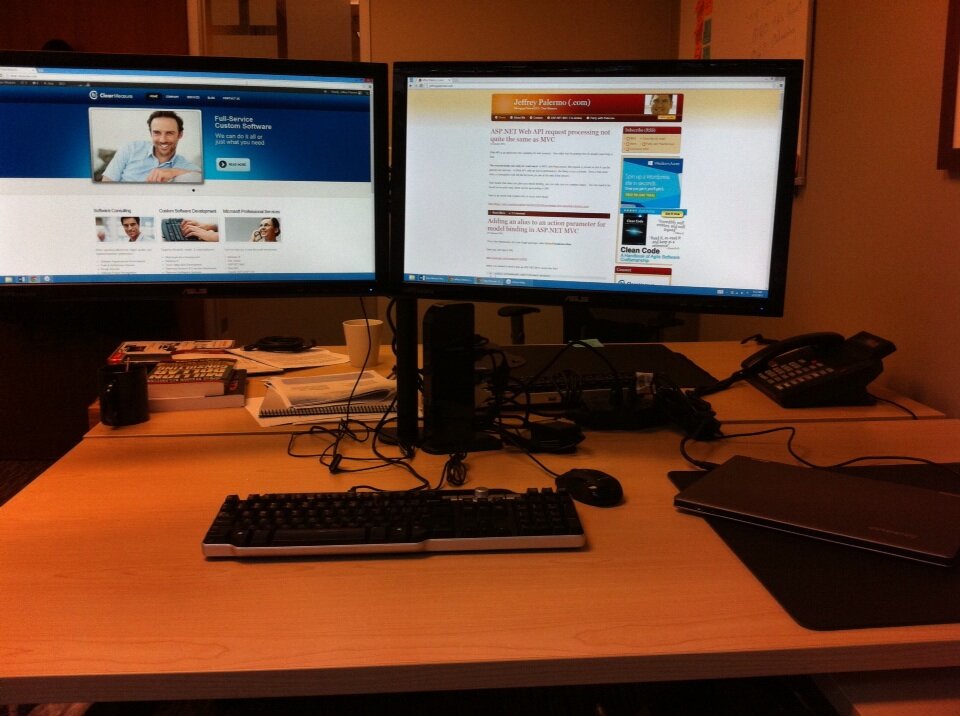
 The Yoga is amazing. The battery life is outstanding, and I can routinely make it last five hours with continuous use. The only complaint is the track pad. It requires a firmer touch for the left mouse click than I’m used to. If you aren’t familiar with the Yoga, it is first a laptop with a touch screen. Then, you can fold the screen all the way back around to form a tablet. The computer disables the keyboard so you can hold it in your hand.
